Evaluating Off-the-Shelf CRMs Against Custom Data Models
Quantifying the workaround tax reveals which path actually costs less over time.
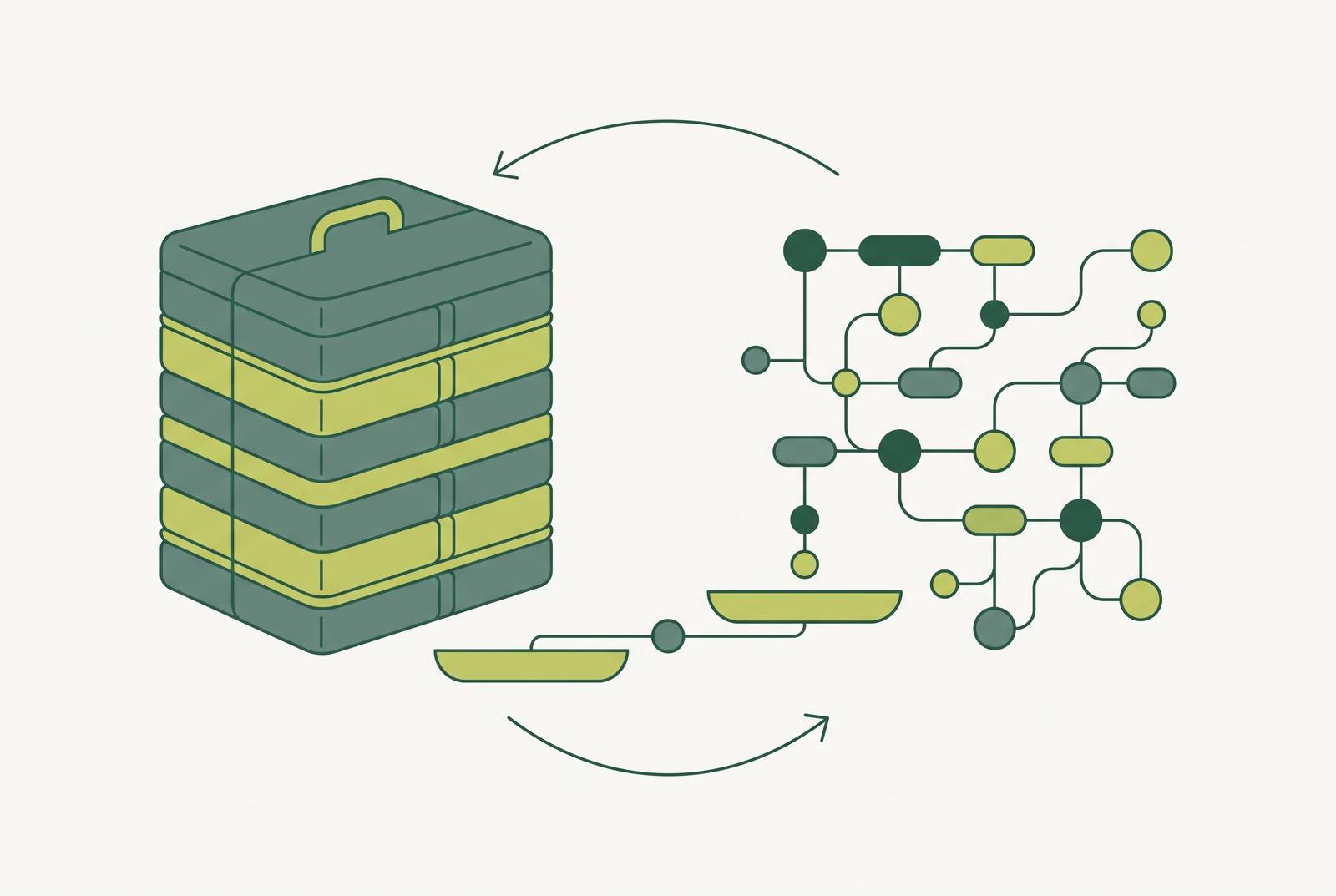
Choosing between an off-the-shelf CRM and a custom data model isn't really a features question. It's a fit question, and the most honest way to answer it is to audit what your team is already doing to make the current tool work, because that behavior is where the real cost hides.
Most teams get this backward from the start. They sit down, pull up a comparison chart, and ask whether Salesforce or HubSpot or Zoho can do X. Wrong question. The right one is quieter and harder to answer: what is your team already doing to compensate for where the tool falls short? LaunchPad Lab found that picking the wrong path here doesn't blow up loudly. It taxes the team for years, quietly, until someone finally adds it all up. This piece is about how to add it up before that happens, using a lens: the workaround tax. Everything below builds from there.
What off-the-shelf CRMs sell and what they quietly assume about your business
Off-the-shelf platforms are built for the middle of the bell curve. Salesforce, HubSpot, Zoho, Microsoft Dynamics 365, Pipedrive: these are engineered around a standard sales motion, a linear pipeline, contact records, email sync, dashboard reporting. That's not a knock. It's the entire value proposition. In 2026 these platforms ship as SaaS: the vendor owns patching, uptime, and the roadmap, and the customer owns the subscription fee.
The advantages deserve to be stated, because they're real:
- Deployment is fast. You're configuring a system, not constructing one from scratch.
- Documentation is mature, and the hiring pool for admins who already know Salesforce or HubSpot is deep.
- Vendors ship improvements continuously, and the security and maintenance burden sits with the vendor, not the buyer.
- Pricing, while not simple, is at least predictable enough to budget against a year out.
The assumption behind all of that is this: Every off-the-shelf CRM expects your team to bend its workflow around the platform's data model, not the other way around. Fine, when the work is common. Sales calls, deal stages, follow-up emails: the standard model covers that territory well. The trouble starts the moment the actual work stops being standard, because that's exactly where workarounds are born.
How workarounds accumulate and why they are invisible on a budget line
How many places does your team export CRM data into a spreadsheet just to finish a task the CRM was supposed to handle? LaunchPad Lab's findings show that if staff are exporting records, retyping the same information across five fields, or spinning up unofficial shadow-IT tools just to route around a gap, that team is already funding a custom build. They're just paying for it in staff hours, in error rates, and in security exposure, rather than in a line item anyone can point to.
That's exactly why it stays invisible. Nobody puts "manual re-entry" on a budget spreadsheet. It appears instead in a slower quarter close, in two reports that don't match because they were pulled at different times, and in a new hire who takes three extra weeks to ramp because half the actual process lives outside the tool. Codebrand describes this as the 80/20 pattern: off-the-shelf platforms nail the standard 80% of the work cleanly. The remaining 20% is where teams actually spend their days, bolting custom fields onto objects that were never built to hold them, stitching together three different apps to approximate one workflow that should take a single click.
So how do you actually surface this instead of just sensing it? A few audit questions do the work:
- How many steps does your most common workflow take inside the CRM, versus how many it takes once you count the spreadsheet, the second app, and the manual reconciliation?
- Which reports get exported and rebuilt by hand every week, rather than pulled straight from the system?
- Where does data live that the CRM simply cannot reach?
- What did the team last call a "customization" that was, if you're honest about it, a workaround wearing a nicer name?
The scale of this problem is bigger than any one team's spreadsheet habit. LaunchPad Lab reports that the average business runs 897 separate apps, and only 29% of them are actually integrated with each other. That 71% gap is not an abstraction. It's the exact terrain where the workaround tax lives and compounds.
What a custom data model means in practice, and what it costs to own one
A custom CRM means the data model, the workflow triggers, and every reporting view get built (or deeply configured off an open-source base) to match how the organization actually operates, rather than the reverse. Kingasterisk frames the whole pitch this way: the software conforms to the business, not the other way around.
Why go custom in 2026 specifically? Forecom Solutions points to three real reasons: full ownership of the data, freedom from vendor licensing terms, and total control over process design. Notably, they don't list "AI makes it cheap" as a legitimate reason.
The build costs break down roughly like this, per Codebrand:
- A focused first version: $25,000 to $45,000
- A full CRM build: $55,000 to $100,000
- A platform-scale system: $120,000 and up
- Annual maintenance: 15% to 25% of the build cost, every single year
That maintenance line is the number most teams quietly forget to plan for.
AI has genuinely changed the first part of this equation. PipelineCRM notes that a capable developer working with an AI assistant can get a homegrown CRM to roughly 90% functional in a matter of days, and the up-front cash cost of that first version has dropped sharply as a result. That's a real shift, not marketing.
The catch determines where the money actually goes long after the headline is forgotten. PipelineCRM's own point is that the first version was never where the money actually went. Maintenance, security patching, and compliance are where homegrown systems drain time for years afterward, long after anyone remembers how excited the team was about the fast v1. And speed doesn't automatically mean safety: Veracode's 2025 GenAI Code Security Report, cited by both PipelineCRM and Forecom Solutions, found that roughly 45% of AI-generated code samples carried a known security flaw, and larger, more capable models weren't any safer on this measure. Bigger model, same risk.
The speed story gets more complicated the deeper you go, too. The METR Institute's 2025 research, cited in Forecom Solutions, found that experienced developers using AI tools were actually 19% slower on complex software tasks, even though those same developers believed they were working 20% faster. AI accelerates routine code. It doesn't accelerate architectural judgment, and a CRM's data model is architecture, not routine code.
So the honest summary of custom builds: perfect fit, full control, and in exchange, the organization becomes a software operator whether it planned to or not.
The total cost of ownership comparison most teams never run
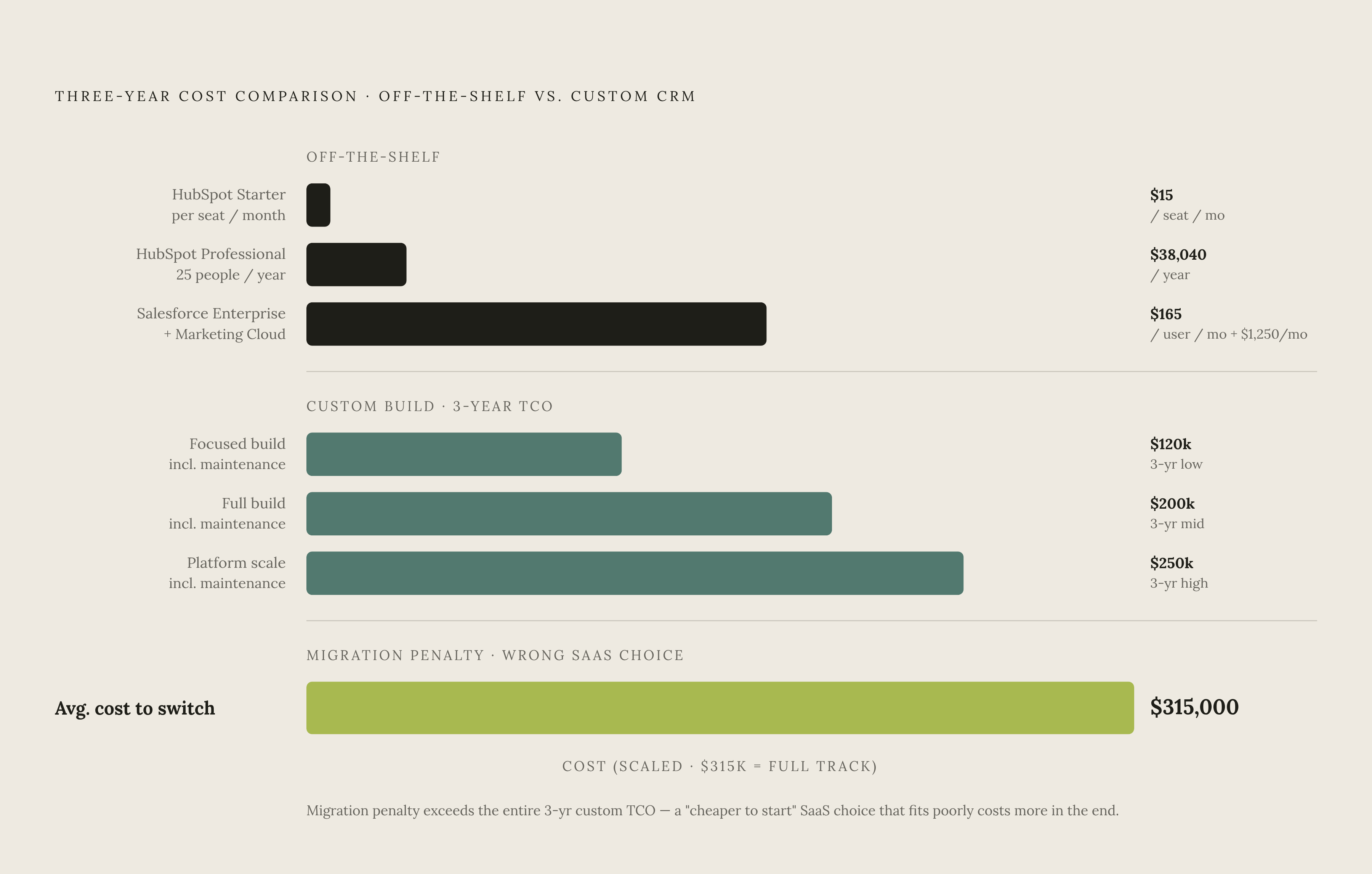
Sticker price is close to useless here. Kingasterisk argues that what actually matters is total cost of ownership over a three-to-five-year window, because that's long enough for maintenance costs, seat growth, and onboarding fees to show their real shape.
Take a 25-person team in 2026. Resonate HQ puts HubSpot's Professional Customer Platform at roughly $38,040 a year for that headcount. A comparable Salesforce Sales Cloud Enterprise setup paired with Marketing Cloud runs approximately $49,500 a year. Neither number is small, and neither is the full story either.
Off-the-shelf pricing spans a wide range depending on where you enter it:
- Tech-Insider reports that HubSpot's Starter tier dropped to $15 per seat per month in early 2026, making it the cheapest entry point for a small team just getting started.
- Salesforce Enterprise lists at $165 per user per month, and Marketing Cloud adds $1,250 or more per month on top of that, separately.
- Onboarding fees are mandatory, not optional, and they belong in the year-one math: HubSpot's Marketing Hub Professional carries a $3,000 onboarding fee, and Enterprise carries $7,000.
Custom builds, over the same three-year window, land in a wider and rougher range. PipelineCRM's illustrative figures put a custom build's three-year total cost of ownership somewhere between $120,000 and $250,000, compared to meaningfully less for mid-market and enterprise suites over that same stretch. These are general figures, not scoped to a specific team size, but the gap itself is the point.
If the off-the-shelf choice turns out wrong and the organization needs to migrate off it, Kong puts the average enterprise migration project at $315,000. That's not a reason to assume switching later is cheap or easy. It's a reason to spend real time getting the first decision right.
None of this TCO math picks a winner on its own. It's a tool for making the comparison honest, nothing more, and nothing less.
When the workaround tax signals "buy" and when it signals "build"
The workaround audit isn't just a list of complaints. Read correctly, it's a diagnostic. What matters isn't how many workarounds exist. It's where they sit in the workflow, and how normal they've become.
A few signals suggest the tax is manageable and off-the-shelf remains the right call:
- The workarounds live in edge cases, not the core workflow that runs every day.
- The team's main process maps reasonably well onto the platform's existing data model.
- Speed to launch matters more right now than perfect fit, and the underlying work is largely standard anyway.
- Nobody on staff has the bandwidth or the skill set to own custom software long term.
LaunchPad Lab argues that the actual risk with off-the-shelf software was never the tool itself. It's forcing that tool into a job it wasn't built for.
Other signals point the other way, toward build territory:
- The workarounds aren't edge cases anymore. They're the main workflow, and staff have quietly normalized them as "just how it works here."
- The sales or service process is genuinely specialized and doesn't map onto a linear pipeline at all, a pattern Dotsquares has flagged.
- Per-seat licensing costs are climbing faster than the value the platform delivers as headcount grows.
- The team needs deep integration with industry-specific systems the platform simply can't reach.
- The CRM isn't just supporting the business. It is, in some meaningful way, part of what makes the business competitive.
There's a middle path here too, and it's more legitimate than it sounds at first. LaunchPad Lab points out that modern APIs make a hybrid setup genuinely workable: keep the best-of-breed SaaS tools where they already fit, and add custom components with data connectors where they don't. Codebrand frames this as a sequencing strategy rather than a binary choice: start off-the-shelf, move to custom only once the per-seat math and the workflow gaps actually justify it. And whichever path a team is on, keeping data exports clean from day one turns a future migration into a project instead of a crisis.
The technical debt layer that neither path escapes
Technical debt isn't a custom-software problem exclusively. Off-the-shelf platforms rack up their own version of it, through configuration drift, features the vendor quietly deprecates, and years of proprietary customization that becomes expensive to untangle later.
Salesforce offers a concrete example here. Salesforce Ben reports that as of December 31, 2025, the platform no longer supports Workflow Rules or Process Builder, so any organization still running automations on those tools has to migrate them to Flow Builder. Companies that have been on Salesforce for over a decade are now staring down that cleanup project before they can even touch newer capabilities like Agentforce. That's not a hypothetical. That's a bill coming due on a platform teams thought they'd already paid for.
Salesforce Ben went so far as to call 2026 "the year of technical debt," and pointed to vibe-coding as the accelerant: AI tools that let almost anyone ship working automation without necessarily understanding what they built or why it works.
It helps to have a framework for sorting debt types. Deliberate debt is a shortcut a team knowingly took, with a plan to fix it later. The harder version is debt that accumulates invisibly, design decisions that only reveal their cost after a year in production, where a product owner sees a feature ship and has no way of knowing that every future feature touching that same area is now going to take noticeably longer because of how the first one got built.
The vibe-coding risk applies just as much to custom CRMs as it does to Salesforce automations. PipelineCRM's point about AI collapsing the cost of a first version cuts both ways: the danger isn't the cheap prototype itself, it's mistaking that prototype for a finished, maintainable system and skipping the architectural work that would have made it one.
Strip away the platform differences and the lesson is the same either way: both paths demand active stewardship. The real question isn't whether debt accumulates. It's who owns cleaning it up, and what that cleanup costs when the bill finally arrives.
Where nonprofits and mission-driven teams face a harder version of this tradeoff
Research suggests a significant share of nonprofits report using CRM software, which sounds solid until you flip it around: a meaningful portion of nonprofits are still operating without one. That gap suggests plenty of organizations aren't choosing not to decide. They're just deferring the decision, often because there's no time carved out to make it properly.
Nonprofit operating conditions make this evaluation genuinely harder than it is for a commercial sales team. Budgets are tight, staff wear three or four roles at once, and mission work always outranks a software evaluation on the priority list, even when the software is quietly costing hours every week.
Commercial CRMs carry assumptions that don't map cleanly onto nonprofit work. Donor relationships aren't linear sales funnels the way a deal pipeline is. Grant tracking, program outcomes, constituent histories: these often get crammed into contact or deal objects that were never designed to hold them. The workaround tax appears here in a familiar shape: a spreadsheet running in parallel to the CRM, quietly doing the real work, because the CRM's data model simply can't hold what the organization actually does day to day.
Custom or purpose-built systems fit better, obviously, but the higher upfront cost and the ongoing maintenance burden are exactly the resources most nonprofits don't have sitting around. So what's actually left? For a lot of resource-constrained teams, the most realistic answer is a hybrid one: a carefully chosen off-the-shelf platform, configured by a partner who understands how nonprofit work actually runs and won't force a commercial sales workflow onto a mission-driven one.
The stakes around getting this right the first time are sharper here than almost anywhere else. CIO Dive puts the average enterprise migration cost at $315,000, and that isn't a rounding error a nonprofit can absorb the way a well-funded company might. Getting the initial evaluation right matters more for a mission-driven team, not less, precisely because there's rarely a do-over budget waiting in reserve.
What to look for in an engineering partner when neither pure path fits cleanly
Plenty of teams land somewhere in the middle: not a clean off-the-shelf fit, not a clean case for full custom either. That's exactly where the choice of partner starts to matter as much as the choice of platform.
MIT NANDA's 2025 research, cited in Forecom Solutions, found that solutions delivered with an experienced partner succeeded in roughly 67% of cases, while purely in-house DIY attempts succeeded in only 33%. That's not a small gap. It suggests the presence of an experienced partner is one of the strongest predictors of whether the whole effort actually pays off.
What separates a partner from a vendor, in practice? A vendor delivers the build and moves on to the next contract. A partner sticks around for the system's ongoing reliability, treating the maintenance window, the security patching, and the slow accumulation of technical debt as part of the job, not as separate work someone else gets hired to handle later. Given what the Fowler debt quadrant makes clear, and given how quickly a cheap AI-assisted prototype can turn into unmaintainable architecture, that ongoing ownership isn't a nice-to-have. It's the difference between a system that ages well and one that quietly taxes the team for years, exactly the outcome this whole audit was meant to catch before it started.
Sources
- Custom Software vs Off-the-Shelf: How to Choose in 2026 | LaunchPad Lab
- Custom CRM vs Off-the-Shelf CRM: Which Is Right for You?
- Custom CRM vs Off-the-Shelf CRM: Build or Buy
- Off-the-Shelf CRM vs. Custom Build: When to Buy and when to Build?
- Custom CRM vs Salesforce vs HubSpot (2026): The Real Math | Codebrand
- Custom CRM vs Off-the-Shelf CRM: The 2026 Expert Guide
- salesforcedictionary.com